In this tutorial I’m going to show you how to begin working with data in Java namely numbers and text. If you’ve been following along go ahead and close our Hello World java file will create a new one over to the default package. Right click select new and class.
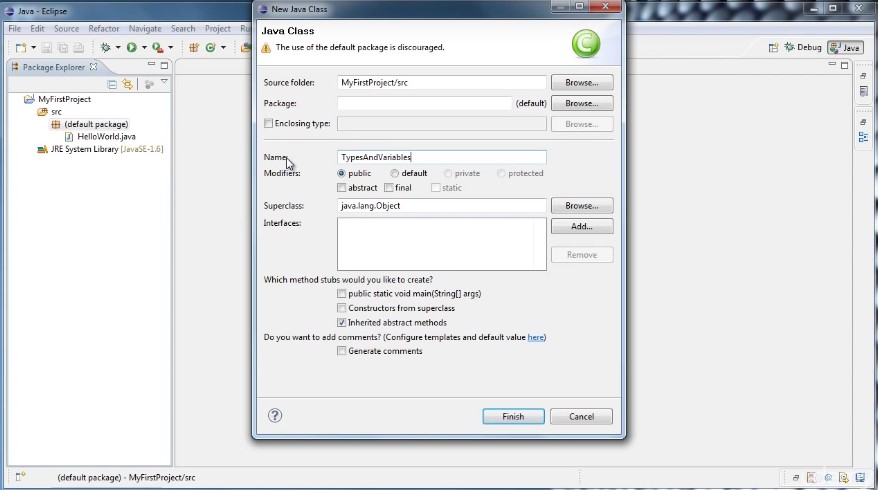
For this class we’re going to call it TypesAndVariables and go ahead and click Finish.
Now let’s just go ahead and get your main method out of the way. If you remember how to do that we type the word main and press control plus spacebar and hit enter and there there’s our main method.
So if we want to begin working with data in Java we will typically want to use a variable.
And if we’re going to create a variable Java needs to know two things; First it needs to know what kind of data is going to be stored.
Is it going to be a number?
Is it going to be some text?
If it’s a number what kind of number is it?
And second it’s going to need a name for the variable.
So say we want to create a variable to store an integer the way we would do that.
In Java we would type int and then following the type we would type in the name of our variable. We’ll just call it myVariable. And every Java statement must end with a semicolon.
So we say int myVariable and then a semicolon.
All right now my variable doesn’t contain anything. Well technically it contains 0 but if we want it to set it to something we could say myVariable = 5.
And now at any time we use my variable it will evaluate to the value 5 and we can see that by doing a system out do you remember the shortcut has s y s o control spacebar.
And then in here we can say my variable.
Now we go ahead and run it. We’ll see that 5 is printed out to the console.

So to explain what’s happening here we could put in a comment and what we’re doing here is we are declaring a variable called my variable that stores to type int or integers.
And on this line we are initializing my variable to the value 5.
Now we can change the contents of my variable anytime we want. Let’s go down after our system out and say my variable equals 10. And then again let’s do this system out of that print line. I’m just going to copy mine and paste it below.
And now we run it will see that 5 is printed out first corresponding to this first print out.
Then my variable is set to 10 and we print it out again and we get 10.

Now we can also do something that might confuse you a little bit. What happens if we say my variable equals variable plus 1 and then again get the system out.
Now conceptually what’s happening here. My variable is going to have a value of 10.
We’re saying 10 equals 10 Plus 1 which is 11 and it doesn’t make any sense. Well let’s see what happens when we run it and it prints out 11 so this is one of the confusing aspects of programming.

You can’t think of this as a mathematical statement. What’s happening here is the right side is being evaluated. And then what that evaluates to is being assigned to my variable.
So the way this runs is my variable which evaluates 10 Plus 1 which evaluates to 11 is assigned to my variable and then we print out my variable and the 11 gets printed out.
I’m going to delete some of our code here. And create another variable and we’ll make it in the integer again. We’ll see. Int myVar2 and this time we’re going to both declared and initialize it in the same line. So the way we do that is just say in my VAR two equals and say seven and a semicolon. All this is doing is it’s doing both steps here on the same line which is a convenience. So now we could say something like we’ll do it.
So again control spacebar SYSO myVariable plus myVar2. And what happens if we run that: you’ll see that 12 is printed out of the console.

So what’s happening here.
We get to the system that out the print line it sees the parentheses to figure out what it wants to print out and it first evaluates this so my variable gets replaced with the 5 and my VAR2 gets replaced with a 7.
And then those five plus seven which is 12 and that’s what gets printed out.
So let’s put a comment on that line from my var 2 saying that we’re declaring and initialising in one step.
Now there are other types of numbers that we can work with when we declare something to be of type INT it can only hold integers; it can’t hold any number with a fractional value. And the reason for that is because computer store Ints and numbers with fractional values differently in memory.
So the type we have to use if we want a fractional value it’s called a double. So we type the word double and say let’s just call it X for simplicity and we can say it equals 2.5.
Now we have a variable called X that refers to a double or a floating point number or a number with a fractional value.
And just to show you that everything works we’ll change that to X and the system out and run it we will see that 2.5 has been printed to the console.
Now what do you suppose happens if we were to say my variable equals x and you can probably already tell that something’s wrong because it flips underlines it with little red squiggly line and you get this red X here and says Type Mismatch cannot convert from double to int. What that means is Java is preventing you from putting this value 2.5 into this variable which is an integer because you would lose precision you would lose the point five part of that number.
So you can’t do that.
but you can do it the other way around.
You could say X equals my variable and that’s just fine.
And the reason for this is because a double can hold integers and that makes sense if we think about it. And let me show you how it works.
If we were to run it and see what it prints out we’ll see that it prints out five point.
Now before when it was just an integer it printed out five.
But because we were assigning it to a variable of type double which contains fractional values it adds on that point zero.

So that gives you some idea of how to work with numbers. If you don’t feel like you totally get it don’t worry about it. We’ll do a lot of this as we continue on throughout the tutorials.
Now we’d like to show you how we work with text. So let’s delete some of this.
Leave our numbers to clear it up here with the comments. If you remember in the last tutorial when we said hello world. We put it in quotes like this.We type it out here to say hello world.Now what this is referred to is a string or a string of characters. And we wanted to create a variable to hold that we would have to declare it to be of type string.
So we type string and we’ll call it hello Equals Hello world. So how this works is we have a string on the right side.
In other words text between some quotation marks and that string is assigned to a variable called Hello that is of type string.

This might be a good thing to mention here.
If you hover over a type or a variable or lots of different things in Java you might get a pop up window
here and it gives you some information about it and it says the string class represents character strings, all string literals and Java programs such as abc are implemented as instances of this class.
Now you don’t have to understand every little detail of that but just to understand that we have a variable called hello and it contains the string Hello world.
So now if we do another print line if you remember a shortcut we can now pass an instance of hello world.
In quotes we could pass an hello and now we run that we’ll see that hello world and still print it out.

Now let’s change this up a bit instead of saying hello world. Let’s take the world out of the string. So now it just says hello comma space.
Now let’s create a second very well type string or call it name equals Charlie.
Now let’s say we want our console to say hello Charlie how would we do that by referring to the variables.
But if you run it right now it says hello.
So one way we can do it is to do another system out that print line and put in a name.
Now we run it and says hello. And then a new line and Charlie but that’s not quite what we want.Let’s say we want him on the same line that we can actually do this say hello plus name and we can delete this last one and we run this we’ll see Hello Charlie was on the same line.

This is called is string concatenation and I’ll put a comment in there.
String concatenation
basically what that means is take the value of hello and appended to the value of name.
So in the end we get one string that says Hello Charlie and I think this is enough to give you a basicidea of how variables and types work and don’t worry we’ll be using them quite a lot.
The key bits of information to get out of this tutorial are declaring variables, initializing variables and then using a variable by its name.
So if you understand that much you’re good to go.
In the next tutorial we will learn how to create our own methods.
Thanks for watching.
 DOM Frontend Javascript ES6+Node.JS+NPM+HTML5+CSS+Webpack+NPM