In this tutorial we’re going to look at how to execute code conditionally. So to get started let’s close our scope that java file right click the default package. So like new class I’ll call this class conditionals and click Finish. You’re going to create my main method inside of the conditionals class by typing in Main and pressing Ctrl+spacebar and hitting enter.
Now let’s have our program produce some output. I’m going to put a couple of print lines in here by typing Syso, Ctrl+spacebar and the first one I’m going to put a string that says “hello” and I’ll do it once more with a string that says “goodbye” and we run that, we see that hello and goodbye is printed to the console.

So ,what do I mean by executing code conditionally? Well so far all the code we’ve written in in this series has executed in a sort of linear top to bottom way, everything in the main method and the methods that get called from it, gets executed.
Now we want to be able to test if a given condition is true and only execute some code when it is. And if it is false, we could skip that code or execute something entirely different.
The way we do that in most programming languages is something called an “if” statement. So to give you an idea of what an if statement looks like I’m going to go to the top of our main method and inside of a comment we’re going to type:
// if parentheses some expression that evaluates to TRUE, close parentheses and go in a bit and say
//do something. So that’s the general form of an IF statement.

So let’s make our system out that print lines execute based on conditions.
So above our system out of print line Hello I’m going to type if and in parentheses and now we need some expression that evaluates to true. The simplest one to use is a simple boolean and a boolean can hold two values either true or false. So we can just say if true then execute this line.
And typically lines inside if statements are tabbed in. We also usually want to surround the code executing after an if statement with curly braces just like you would with a method.
So after if true you would put an opening curly brace. And after a print out,it would put a closing curly brace and now if true, which is always true, will run all the code within
the curly braces and the if statement ends and we’ll continue with our program so we can run that and just to show you it works.
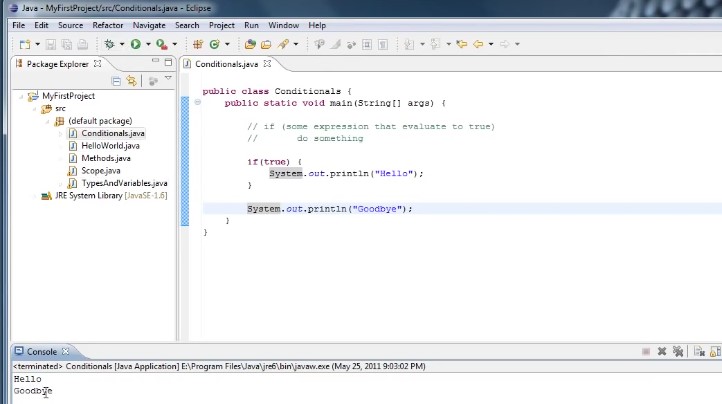
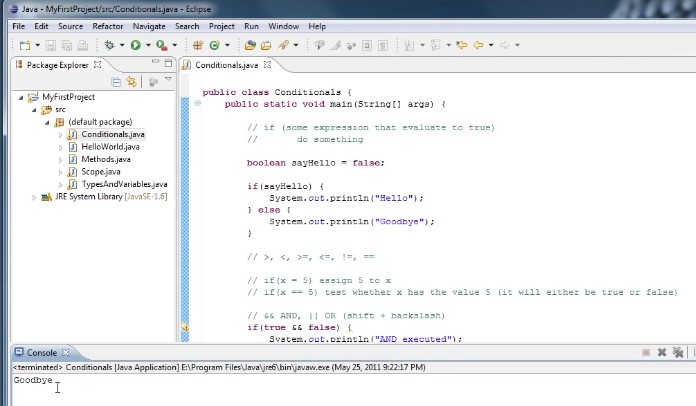
We’ll see Hello and Goodbye is printed to the console. And now if we change true to false then run it again:

We’ll see that only good bye has been printed to the console. So our programs skipped executing this line of code System.out.println(“Hello”); because it did not pass the condition.
Now instead of just saying if true or if false I’m going create a variable and the variable will be typed Boolean and we’ll call it say hello and we’ll set it equal to true.
And now instead of saying a false you can say if sayHello. Now what that essentially is saying is if sayHello evaluates to true which it will then execute this line of code.
I’m going to create another variable called boolean sayGoodbye and said that equal to false and down here around our goodbye print out with an if statement if say goodbye opening curly brace closing curly brace and tab it in.And now we run it.

We’ll see that only Hello is printed out because goodbye’s false. So this line does not get executed.
Now say that we know that we either want to say hello or goodbye but we never want to say both at the same time. And the way to do it is by using what’s called an else clause.
And the way that works is: we execute the if statement, if the if statement evaluates false.
This code does not get executed but if the if statement is followed by something called an else clause which looks like this after the closing curly brace we put else and then another opening curly brace and closing curly brace.
If the if statement evaluates to false then whatever is in the else statement gets executed.
So we could copy our system out that print line goodbye and put it inside or else clause and we could just go ahead and get rid of our goodbye statement as well as our say goodbye variable and now we run it say hello is true,

and hello gets printed out and we said Say hello to falls and run it again. We’ll see Goodbye is printed.
Now there are many different conditional operators we can use inside statements that will evaluate to true or false.
Some examples might be if five is greater than 10 that would evaluate to false or if 10 is greater than five that would evaluate to true.
Likewise you would also have a less than statement 5 is less than 10 which would
evaluate to true.
So these are all kinds of conditional operators we can use.
And I’ll put some of them in a comment here, we can use greater than>, less than<, greater than or equal to >=, less than or equal to <, not equal which is a exclamation point followed by an equal sign !=, Now what an exclamation point means in this context is a logical not.So this would read as not equal to.

And lastly if we want to test if two things are equal to each other we would say equals equals. ==
Now this double equals operator is the source of a very common programming mistake.
For example if I was going to write an if statement and I wanted to test if some variable x is equal to 5.
It’s tempting to just write it as this as if X equals 5
if(x = 5) but the way Java interprets this is it gets to the if statement it then evaluates what is inside the statement which isn’t testing equality, it’s actually assigning the value 5 into X.
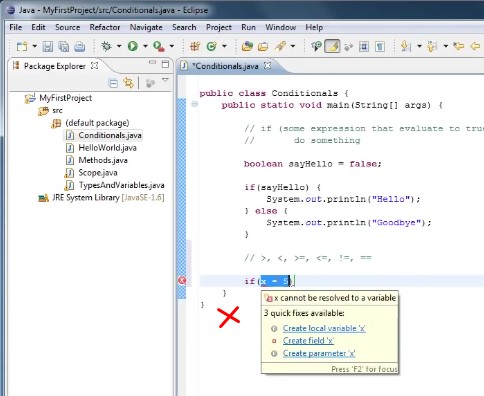
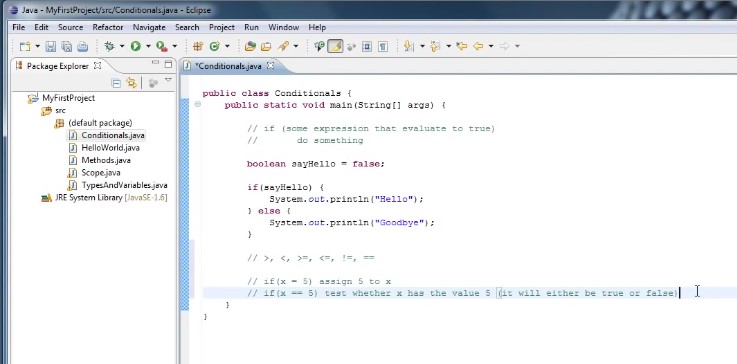
if we want to test it x is equal to 5 we would type X double equals 5. So let’s comment those out and put a little note in.
So the next single equals five that will assign 5 to X double equals five.
It will test whether X has the value five. In other words it will either be true or false.
Now with an if statement we can also test if multiple conditions are true, or have only one of several conditions is true. And the way we would do that is to use operators that test whether some condition and another condition are true or some condition or another condition are true.
So what we need is an operator for and then an operator for or and in Java the end operator looks like two ampersands && and the operator looks like two vertical bars || which are on my keyboard is shift plus backslash.
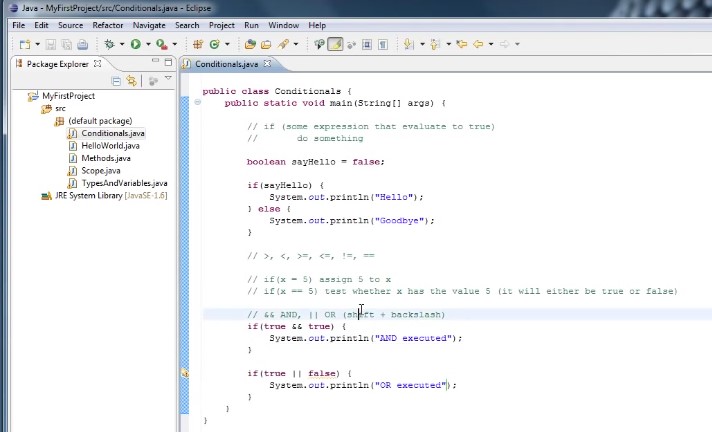
so to demonstrate these we could write an IF statement like if true and true.
It’s just an out and executed and if true or false system out or executed.

And if we run that we’ll see that both of them are executed. So we could change this up and say if true and false and false or false :
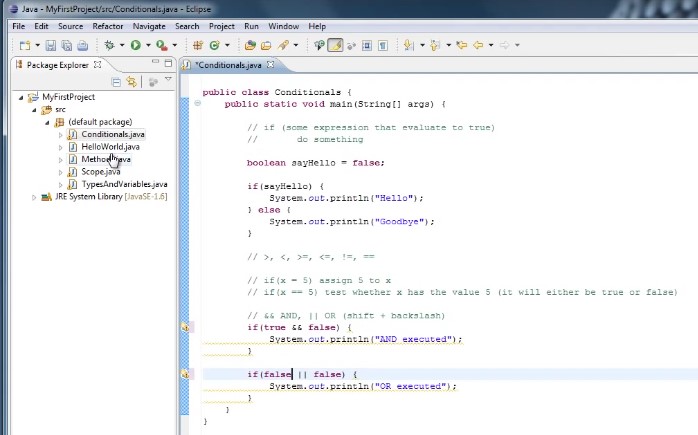
we should see that neither of them gets executed.
Now you can accomplish the same functionality by embedding if statements inside of other if statements. So in this case if true and false I could take out the end false and say If true then whatever is inside of these curly braces will run and inside the curly braces I could say it falls and put another set of curly braces and now if true gets evaluated and whatever is inside of it true gets executed which happens to be another statement which evaluates to false. So this line does not run. So logically if true false is equivalent to if true and false.
So I’m going to go back to what you had before. By doing so now let’s create a more practical example let’s say our problem is we are creating a video game and our character is on the screen and we want to test to see if our characters exposition is going
off the screen either on the left side or the right side. So how can we set that up.
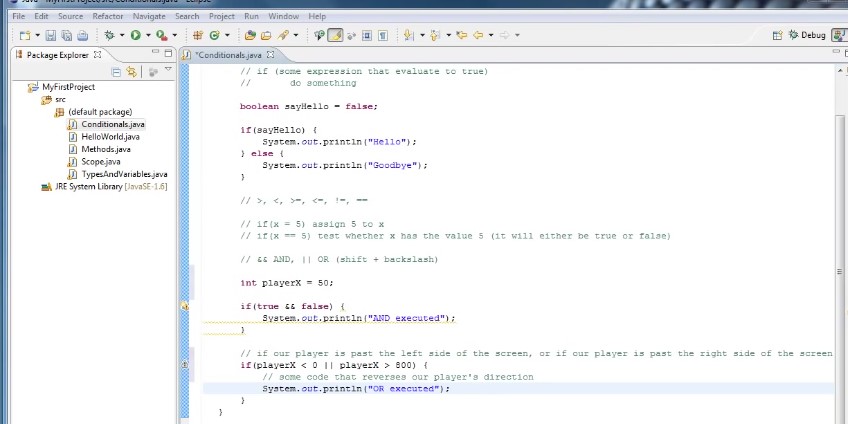
Well let’s create a variable and we’ll say in player X equals 50. So this variable represents our players exposition on the screen.
So what we want to do now is to test if Player X is either less than zero or greater than whatever the width of our game is.
So we’ll be going down here to the OR statement.
And first we would type if Player X was less than zero.
So this evaluates to true it means our player is past the left side of the screen or we want to test player x is greater than say eight hundred which would mean our player is past the right side of the screen and then inside of the statement we could put some code that reverses our players direction so that the player gets to one side of the screen.
He’ll reverse directions and go towards the other.
So let’s put a comment above that if statement will say if our player is past the left side of the screen or if our player is passed the right side of the screen and if either of these is true then execute the code inside of the statement.
Now there’s one last thing I’d like to talk about with their statements and that is that you can chain them together. If we go back up to our first example where we say if say hello we can actually change several conditionals
together and to do that I’m going to create another variable called say hey and set that equal to false initially.
And now we’ll see if say hello to this line of code.
Else if say hey we’ll change goodbye to hey.
And finally Else said goodbye.
So the way this executes is say hello evaluates to true will print out hello and say hello is false.
So this line does not get executed Else of say hey evaluates to TRUE.
Print out hey and say hey is false.
So this line does not get executed else.
System.Printline goodbye.
So because neither say hello or I say hey we’re true.
We get to this statement and goodbye’s printed out and we run it we’ll see that.
But if we were to set say Hey true for example and run it we’ll see that only here is printed out.

So the way a chain of statements gets evaluated is only the first statement evaluates evaluate to TRUE gets executed.
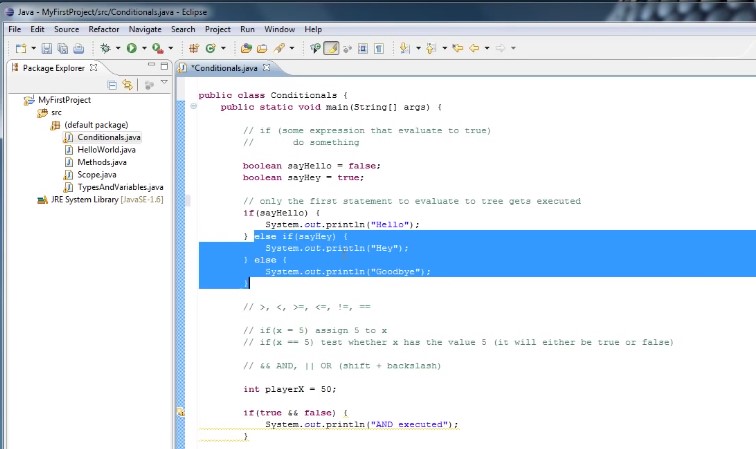
And what I mean by that is if say hello is true the rest of this does not get executed. If say Hey is false and say here is true the ELSE does not get executed and you both say hello and say hey are false
then only the is executed and we can also remove the else and if both are false then neither of these signs will be executed and our program will simply continue.
So to reiterate on what we’ve learned in this tutorial we have an if statement followed by an expression that evaluates to either true or false followed by some code to execute if the condition is true. And we can use these relational operators to test if something is true or false and we can also use boolean variables.
And if you want to test for multiple conditions you can use the and operator or the or operator.
So by now you should have some familiarity with IF statements and be fairly comfortable experimenting with them.
Thanks for watching.
 DOM Frontend Javascript ES6+Node.JS+NPM+HTML5+CSS+Webpack+NPM