This tutorial we’re going to cover loops in Java. So to get started let’s close our conditionals start to have a file. Right click the default package select new class and we’ll call this class loops.
And as usual that’s create our main method by typing main pressing control space bar and hitting enter.
So let’s say we want to do something like print the numbers 1 through 10 to the con..
How would we do that using what we’ve covered so far.
Well you’re probably thinking we could do a whole bunch of system not print lines.
The first one saying one and then we could just copy paste that for two three four five six seven eight nine 10 and then go ahead and edit all the numbers so we’d have ten nine eight seven six five four three two and one. And now we went ahead and ran that.
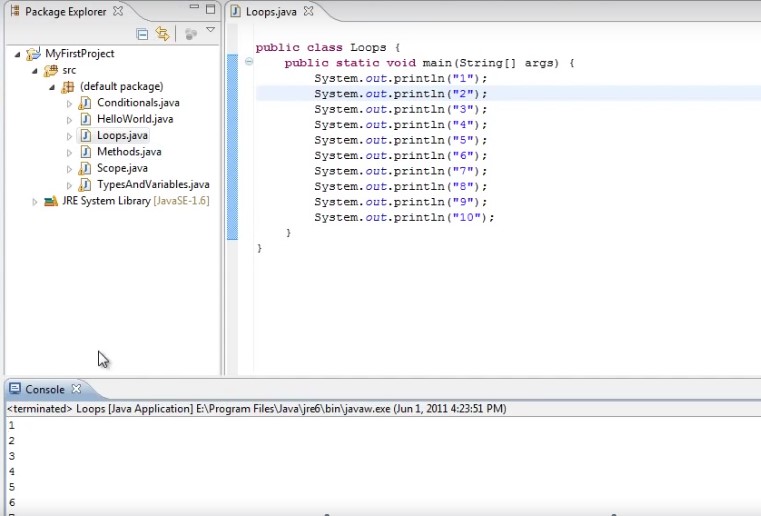
We will see that one through 10 has been printed to the console.
Now you can see that this wasn’t all that difficult but it is kind of tedious and you can imagine how much more tedious it would be if you had to print 50 things to the console or 100 things or a thousand things. So what we really need is some way to execute the same code over and over and that’s exactly the functionality that loops provide. In Java there are three main types of loops.
The easiest of which to understand is probably the while loop. Now a while loop looks much like an IF statement. So all we do is type the word while and then parentheses and inside the parentheses we need some expression that will evaluate to either true or false.
Just like with an if statement so we could say while true. And then curly braces now whatever’s inside of these curly braces will run over and over and over as long as this condition remains true. Now if we were to run this right now our program would never end because while true is an infinite loop.
So what will we need to do to set up our count 1 to 10 code in a while loop.
But we need some variable to essentially count the number of times we go through the loop.
So it’s above the loop type in int counter = 0
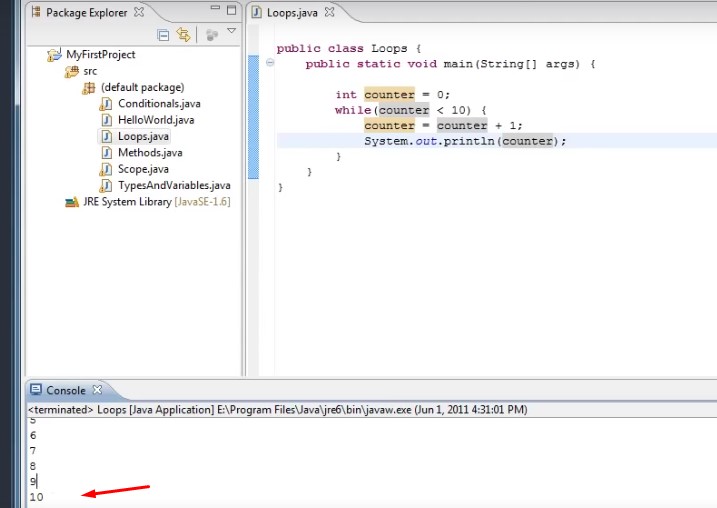
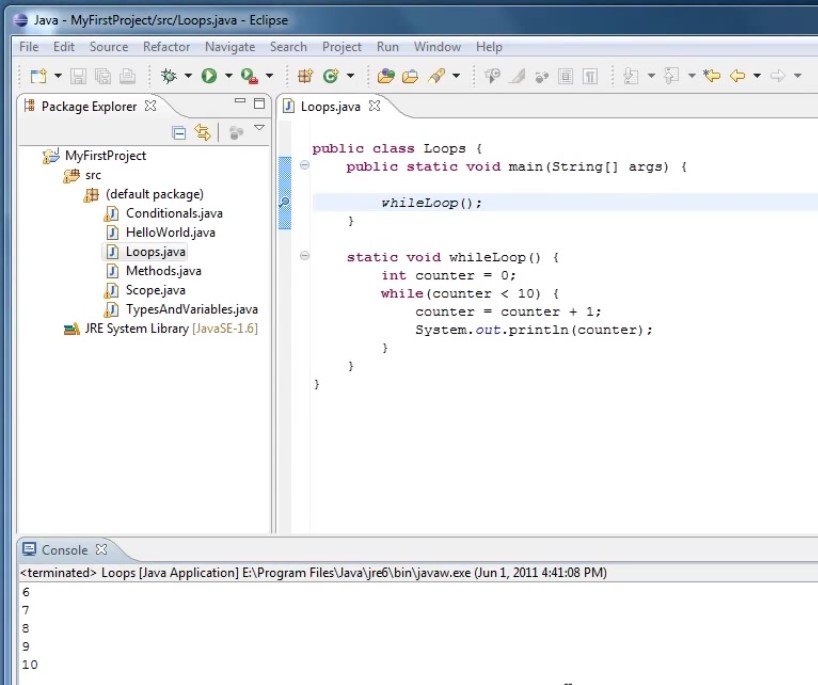
And now inside of a WHILE loop we can say something like while(counter< 10) {
Counter because less than 10 and inside of our while loop we can say counter equals counter plus 1.

So now what happens is we get to the last line we initialize a variable called counter to zero. We then enter a while loop and while counter which is zero right now it’s less than 10.
We execute this code.
The code will add 1 to counter counter will be one. One is less than 10 so it executes the code again then counter will be two to less than 10 and so on and so on until the counter is 10 and 10 is not less than 10. So this would evaluate to false and the loop would exit.
So let’s copy one of our system outs and just get rid of all the rest.
And now we’ll put one of those system that outs inside of our while loop.
I put it after we increment the counter and now instead of printing out 10 we could just print out whatever the value of counter is.
So now we were to run that we’ll see that once again one through 10 gets printed to the console.
Now we show you how Java goes through this code. I’m going to introduce the debugger, but first go to the line where you have encounter declared and then this little margin to the left now onto the right click and select toggle breakpoint and you’ll see this little dot appears on that line.
Now I want you to go up to window open perspective de-bug.
There also may be a button that says de-bug in Java and you can switch between perspectives that way.
Now we can go to this little debug icon and click it and our program will run up to the break point we toggled on.
So right now our program is running but it’s paused at this line of code.
And what the debugger allows us to do is to execute code line by line and to really see what’s happening and how Java is running the code.
So to do that we go to this arrow icon here and click that this is called step into and what it essentially does is it executes the next line of code.
And now we’ll see that our highlighted code went down from int counter = 0 to our wild counter < 10.
So now if we click that button again or press F5 we will enter the while loop will run our counter equals
counter plus 1 code which will change the value of our counter to 1.
Well then print out the value of counter you’ll see what is printed to the console.
And then our code went back up to the while loop and now we’re going to evaluate the counter is less than 10 again.
Step into, and once again counter gets incremented. Now counters two.
And once again we’ll print out the counter
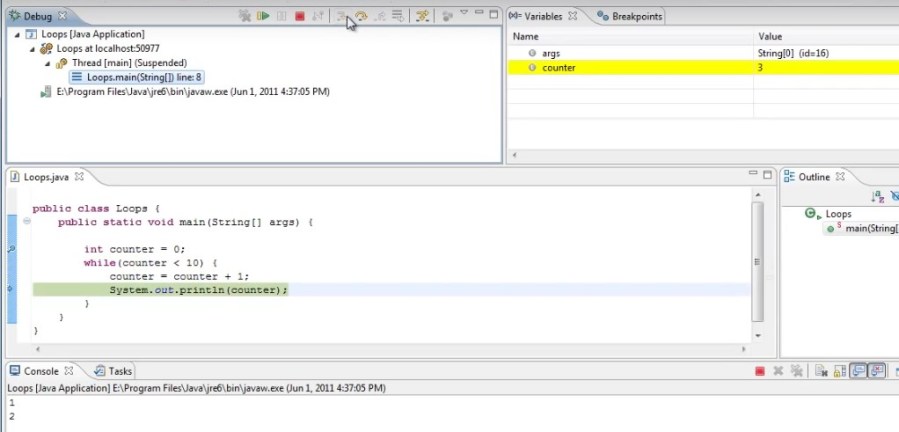
and you can just keep doing this five six seven eight nine.
And now on our last iteration we’ll print out counter we’ll go back up to wildcatters less than 10.The current value of counter is 10.
And if we could step into again we’ll see that it does not execute the loop body and our program finishes.
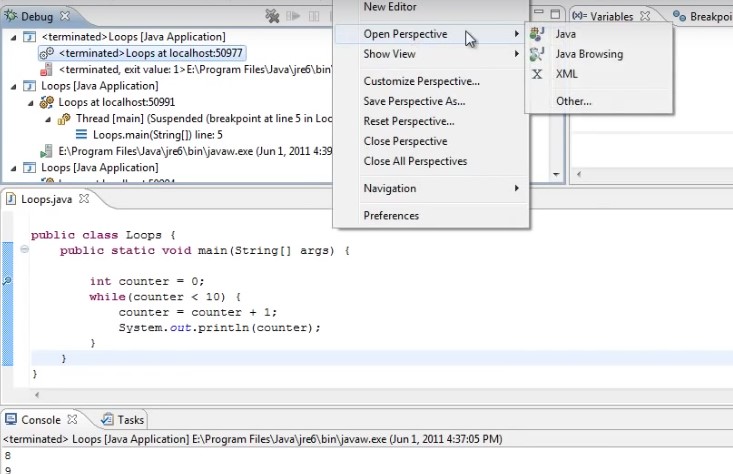
So now to get back to our development perspective we can go to window open perspective Java or just click the button on the upper right of you have it.
So that is a WHILE loop.
Now there are two more kinds of loops I’m going to show you. So to keep everything separate I’m going to create a method for a whileLoop() and put all this code inside
of it and then create different methods for each different kind of loop.
So I’m going to go after the brace for Main and type static void while loop parentheses opening curly brace.
I’m going to cut all the code out of Main and paste it into a while loop.
And now if you want to run that you would simply call while loop for Main and just to show you it works so again one through 10 is printed to the console.
So what if we were to set counter to 9 initially and then run it and see that only 10 gets printed to the console.

And what if the counter was already 10. And we run it then we’ll see that nothing even happens. There is no output to the console because this evaluate to false.
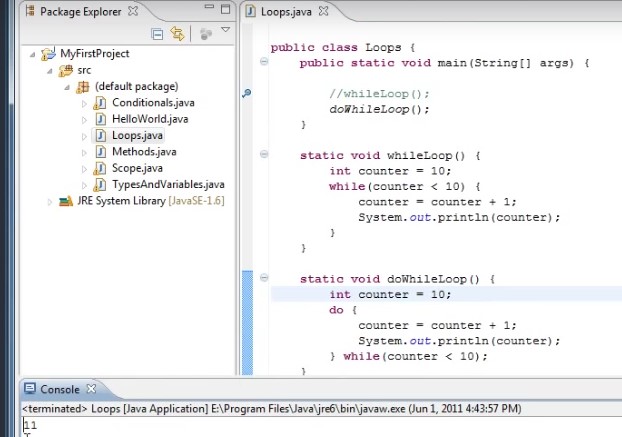
Well what if we wanted a loop that no matter what, would always execute at least once and that’s the functionality that the next type of loop provides. It’s called the doWhile loop. So for that I’m going to create another method name it’s static void do while loop parentheses opening brace. And the way this works as we type do opening curly brace and after the closing curly brace we put a while and then some condition that will evaluate to TRUE or FALSE.
Now this works much like a while loop up here except you evaluate the condition which tells you whether or not to do the loop again after it already runs.
So even if the condition will evaluate false the first time through it will still execute the code once.
So if we wanted the same functionality we could just copy the code up here pasted in here and we need to declare the variable country 0 and then fix our condition to counter is less than 10.And then inside of main we’ll call that loop.
Do while loop and we’ll comment out the other loop and run the code and we’ll see that once again one through 10 is printed to the console and this time if we were to set counter to 10 and run it
and see
that 11 it’s printed to the console because the code in the loop body ran the first time through even though the condition is false because the condition is not tested until after the loop body runs once you’ll probably be thankful to hear that do while loops are actually pretty rare. I don’t see them very often at all.
However the next kind of loop called the forLoop is very common and unfortunately it can be the most confusing to see the first time. So to set that one up we’ll create a new method after a do while loop method will type static void for loop parentheses braces.
So here’s how for loop looks we would type the word for.
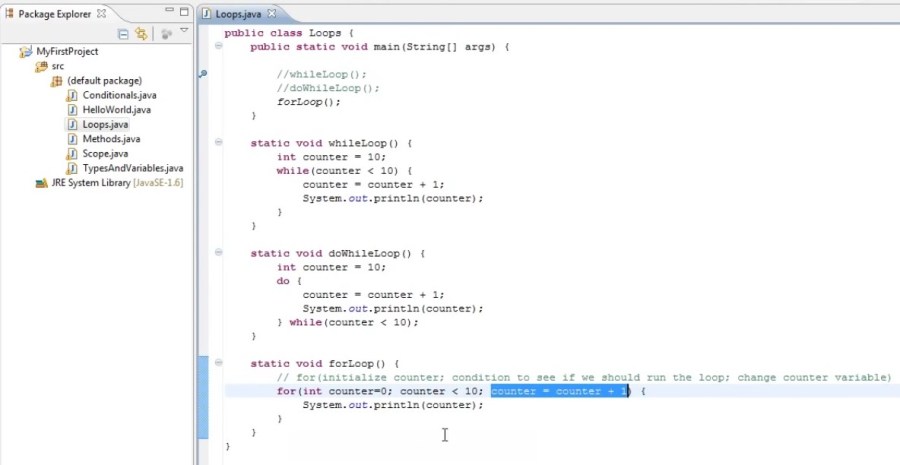
And we could say something like encounter equals zero semi colon counter because less than 10 semi-colon counter equals counter plus 1 and then Curly Braces And now we could copy your print line and put it inside of the loop body so you can see that there there’s three parts inside of the for loop here separated by the semi-colons.
And to explain what they do we’ll put in a comment we’ll say for now in the first part of the for loop we’re essentially initializing some variable. We’re going to use That’s our counter so we’ll say. Initialize counter ; and the second part of the for loop is the condition that we check to see who will run the loop.
So the condition to see we should run the loop and semi-colon.
And the last part of the for loop is how we change our counter variable after each iteration of the loop. So we could say change counter variable.
– So in the first part we’re initializing a variable called counter to the values zero.
– And the second part we’re saying ball counter is less than 10, we want to run this loop.
– And in third part we’re saying after the loop runs we want to add 1 to counter for the next iteration
and we run this right now.
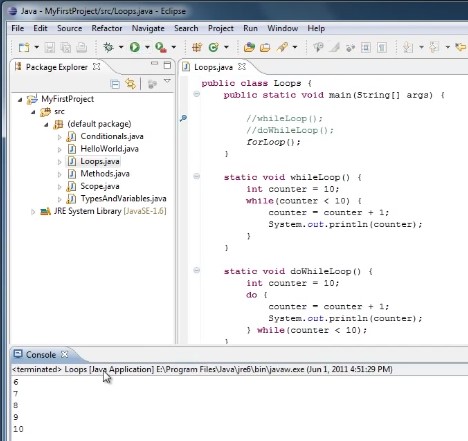
Well I have to comment out or doWhile loop and call for loop method and run it will see that it prints out at 0 through 9 not 1 through 10.
So what’s happening this time??
Well because in our previous loops we added the value to counter prior to printing it out.
We got the values 1 through 10 this time in the for loop.
The value doesn’t get added to the counter until the very end because it’s automatically done for us.
So if we wanted to actually count 1 through 10 we would have to initialize our counter to 1 and then count all counters less than 11.
Or you could say it less than or equal to 10.

Now we run that again and see that one through 10 is printed to the console.
So hopefully that was a gentle introduction to loops. And if you don’t quite get it don’t worry about it. Loops are definitely something you’ll see a lot of going forward.
Thanks for watching.
 DOM Frontend Javascript ES6+Node.JS+NPM+HTML5+CSS+Webpack+NPM