In this tutorial we’re going to cover access modifiers so I’ll get started by right clicking the default package selecting new class and I’ll call this class AccessModifiers and click Finish.
You’ve already seen examples of access modifiers for example when we create our main method by typing main and personal control spacebar.
You notice that the keyword public is attached to that method. Now public is one of Java’s access modifiers. The other three are private, protected, and default.
So let’s create methods stubs for each.
let’s say public void doSomethingPublic()
let’s say private void doSomethingPrivate()
private say the protected boy do something protected
and for the last modifier which is de-evolve access you just leave the access modifier off so we could just say with Lloyd do something.
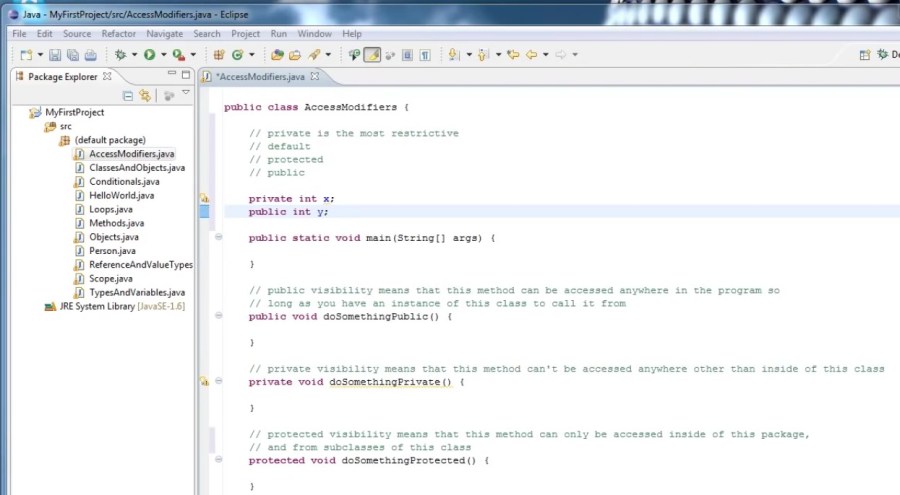
So basically access modifiers can put restrictions on how parts of your code can be accessed, if at all. Because our doSomethingPublic method has public visibility, it can be accessed anywhere in our program, so long as we have an object of tiebacks as modifiers to call it from, so let’s put in a comment saying:
// public visibility means that this method can be accessed anywhere in the program ao long as you have an instance of this class you call it from.
And we’re going to break that into two lines.
Now what about our doSomethingPrivate method this one has the access modifier private.
Well what private means is that this method is not visible outside of this class. So no other parts of your program can access it.
So to put in a comment for that we could say:
//private visibility means that this method can’t be accessed anywhere other than inside of this class.
Now the other two modifier is protected and default, you won’t be able to fully understand until we cover packages and inheritance but we’ll put what restrictions they impose and comment anyways. So protected visibility means that this method can only be accessed inside of this package and from subclasses of this class and you will understand what a subclass is when we cover inheritance and I will probably cover packages in the next tutorial.
And for the default access modifier:
//default visibility means that this method can only be accessed inside of this package.
So default is very similar to protected except protected allows subclasses. Outside of this package to access the method.
And again that will become more clear once we cover inheritance.
So if we look at the for access modifiers and kind of rate them in terms of how much access they restrict we would say that private is the most restrictive.
After private it would be default because default means that it can only be accessed within this package.
The next would be protected because it includes this package as well as subclasses.
And finally it would be public which means that anything that has a reference to an object can call the method through that reference. Now all of these modifiers can also be applied to variables.
For example we can say private int x and public int y as well as protected and default.
Now generally speaking you want to keep everything as private as possible.
And if you recall in a previous tutorial we created methods called getters and setters which allowed us to get the values of and change the values of our variables.
Whenever you use getters and setters your variables should probably be private.
You could make the case to make them protected or default but they certainly should not be public.
So that’s about all I want to say about access modifiers for now. And once again we’ll revisit this and show examples once we’ve covered packages and inheritance for
now just know that in general you should try to make methods and certainly variables as private as possible.
This helps to both make your program more secure and to simplify the interfaces for your objects.Thanks for watching.
 DOM Frontend Javascript ES6+Node.JS+NPM+HTML5+CSS+Webpack+NPM