In this tutorial we’re going to cover arrays which are one of the most basic data structures and programming.
So to get started once right click our tutorials that basic package select new class and we’ll call the class arrays. And let’s create our main method by typing make passing control spacebar and hitting enter.
All right. So an array is a data structure. So just what exactly is a data structure.
Well we know what data is. Some examples might be things like Index Y person John.
You know these are variables that store certain kinds of data that we can use now a data structure is a way to organize or structure that data in a particular way usually so that it can be accessed efficiently to solve whatever problem is at hand and data structures are a huge part of programming regardless of what language you use. And there are many different kinds of data structures out there.
In fact if you major in something like computer science you’re likely to take a full year’s worth of courses just on data structures.
In most cases though you can get by with the simple structures but the more structures you become familiar with the larger your toolbox becomes and you’ll be better able to think about how to solve certain problems.
So this tutorial is about arrays. What are arrays. Well recall that when you declare a variable something like int X what you’re essentially doing is setting up a box in memory that looks like this.
And we’re calling that box x. Now this box will either hold a value or a reference depending on the type of the variable is in our case it’s an int.
So it’s a value type.
Now what an array is is setting it up in memory so that you can have multiple of these boxes sequentiallyveach one capable of holding the same type.
So we wanted to create an array that could hold for ints.vIt might look something like this where we get this box and the box would then be subdivided into four segments and each one of these boxes can hold in value. So for example we could put five in the first box three in the second box zero and the third box and one in the fourth box.

And now we can use the array data structure to access this data instead of having to refer to each element with a different variable name. So that’s the concept.
Now let’s look at how it looks in code.
So when we say int x: // we are creating that one box in memory that can store one into value.
And now we want to create an array that can store those four values while it works in a similar way. We have to declare the array and then initialize the array.
So how do we declare an array. We start with a type of data that we want our array to contain in our case it’s int and now we need to tell Java that we are declaring an array of ints not just a single int.
And the way you do that is with square brackets. And now we can give our array a name so we could say my array and then semicolon.
So at this point we’ve declared our array but we haven’t actually created those four boxes in memory yet. The way we do that is we have to initialize the array and how we initialize an array looks like myArray = new int and square brackets.
And now inside of the square brackets we put the number of items we want to be able to hold. In our case it is four and then a semicolon at the end.
So now we’ve created those four boxes in memory and we can put values in them.

before we get to that though, what’s common to our code on this line we are
// declaring an array that will store ints on this next line.
We are
// initializing our array to be capable of holding 4 ints.
So now how do we assign values to those boxes. Well before then we have just one variable like our index and we could say X equals 5. This time though we have an array.
So let’s say we want the first element in the array to be 5, How would we do that?
Well we would type my array square brackets and now we want to access the first element in the array. Now this could throw people off sometimes because with arrays you start counting from zero which is very common in computer science.
So we would say my Myarray zero with Element equals five.
And now that first box in our array will hold the 5 and it’s the same sort of thing for the other boxes in the array. You’d say my array one equals three. My array two equals zero and my array three equals one. And now we go back to our picture we can see that our zero element is five.Our first element is three.Our second element is zero and our third element is 1 for a total of four boxes.
And since all of these boxes just told the Ints we could actually assign my area zero the value of x instead of 5 directly.

So now we don’t know how to assign values but what if we just want to get a value out of it.
Well it’s the same sort of thing when you do a SYSO or system out. And now let’s say we want to know what’s in my array too. And if we run the application
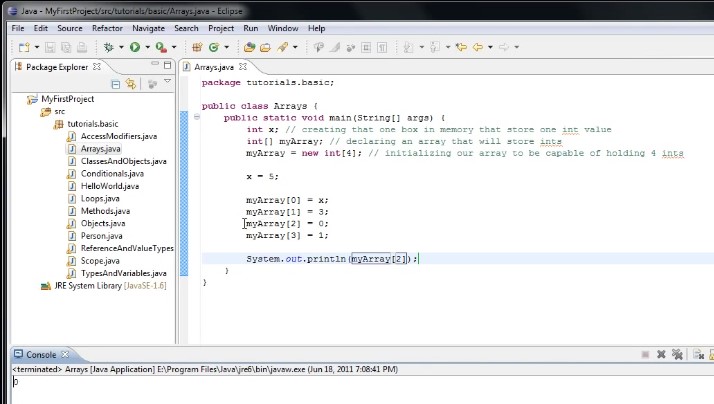
we’ll see that 0 is printed out and we could change that and see what’s that array index 0 and print that out and we’ll see that 5 is printed out and that’s what we’d expect because we assigned the value of x which is 5 to myArray at index 0.

Now arrays usually work hand-in-hand with four loops. In fact it’s so common that if you were to type the word for and then press control spacebar the first thing that pops up is this for iterate over array that we select that it will auto complete for us and if we look at what it’s doing you can see four equals zero. So it’s declaring an int variable is our counter. It’s saying well that counter is less than the length of my array increment the counter and then we’ll do something in here for every element in the array.

So we could print out every element by cutting our system out and pasting it inside the for loop and instead of printing out my arrays 0 we would print out my array.
And now we run the program.

We’ll see that 5 3 0 and 1 are printed out. So this is called iterating over an array.
Now there is a somewhat cleaner way to do this and that is by using a new version of the for loop which was created to iterate over a collection and an array just happens to be a collection.
So the way the new for loop works is we would say for(int number : myArray){
And the way to read this is for every number in my array do something and it’s going to do the exact same thing as this for a loop.
The only difference is that each time the loop iterates we can get the value in that index in the array by using the number variable.
So could do just about that print line instead of my array.
I would simply say number and i’ll we come into this other code and run the application.
You’ll see that once again 5 3 0 1 is printed out.
Now I show you what happens with a common mistake when you begin working with arrays and that is if you try to assign a value outside the range of the array, or we try to get a value from outside the range of the array.
For example if I were to say my array four equals zero and run the application will see this in the console exception in thread main Java. lang.array index out of bounds exception:4 this is really the only data you have to be concerned with.
It’s telling you that the array index is out of bounds and the index at which it’s out of bounds is 4. And that makes sense because our arrays of length 4.

And it starts counting from zero.
But until you get used to the zero count thing you might end up seeing that array index out of bounds exception.
Let’s say instead of four elements just to show you the power of arrays we want to store 50000 elements we’ll change or comment to 50000.
Now it wouldn’t make much sense to store values into that array using this type of approach. Instead we’re going to use a for loop.
So we could sayfor (int counter = 0; counter < 50000; counter++) {
myArray[counter] = counter;
}
So when this runs are raised essentially going to contain the values 0 through forty nine thousand nine hundred ninety nine and then our for loop down here we’ll print out all the values in the array.
Now we can comment out this chunk of code by typing forward slash star.
And then at the end where we don’t want it commented anymore we can type star forward slash

and let’s run it.
49999 and our console is pretty full with numbers. Then let’s do one more quick example let’s come out our array initialization here and we’re going to initialize it in a different way.
Now I will say my array equals new int and now instead of putting a number in those brackets we can put curly braces in a semi-colon and inside of those curly braces we can just put a list of numbers and Java will then automatically initialize the array to contain those elements so we can put in 1 2 3 4 5 6 7 8 9 10.
And now let’s comment out for loop here. And now we just printed out.
It should print out 1 through 10 and you can see that it does.

So now you should have an idea of how to create arrays and how to use them and hopefully you can see that they are very powerful and you can create arrays to store any type of data; you can store ints, or we could even declare an array to store person objects called people and we could initialize that array to store many people as we like and then store person objects into that array.
And one last thing I should mention is that an array is actually an object. So if we were to type Myarray. we’ll see a list of methods we can call on that object. Now an array is a pretty lightweight object.

There isn’t much you can do with it. But as you noticed in our For loop we can get the length of the array and use that however we might need. Thanks for watching.
 DOM Frontend Javascript ES6+Node.JS+NPM+HTML5+CSS+Webpack+NPM